AI Documentation Assistant
Exploring how AI and automation can make knowledge work faster, more structured and easier to consume.
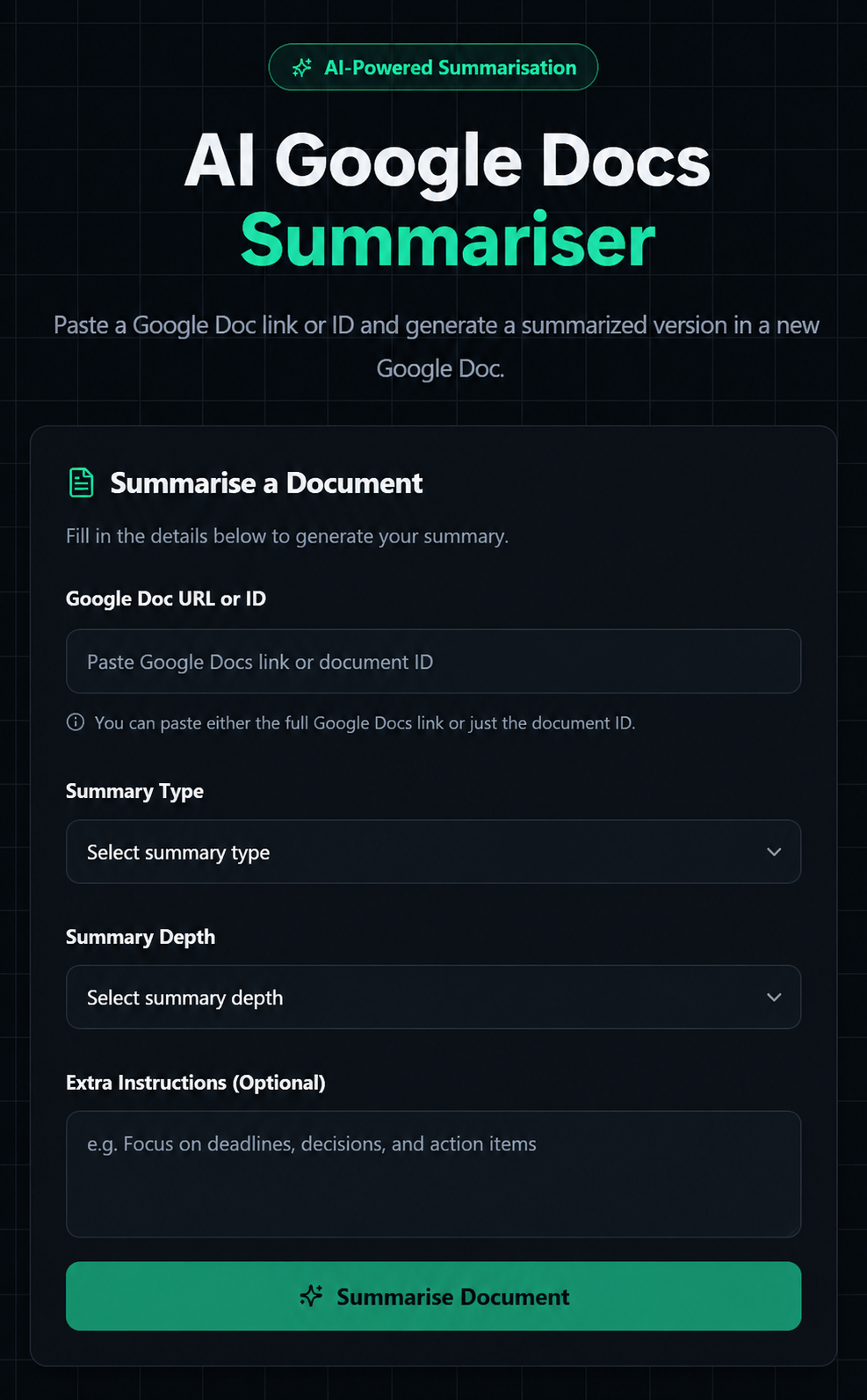
Frontend
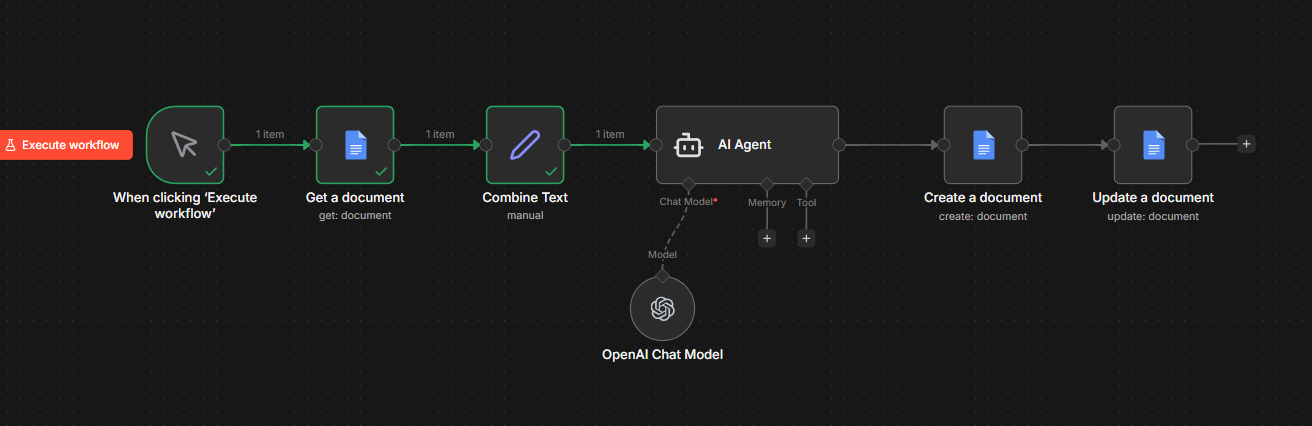
Backend
Backend built in = 2 days
Frontend + Connecting backend built in = 10 days
The Question
Can AI reduce the time spent on reviewing and passing on lengthy documentation without losing the context that makes it useful?
The Challenge
Reading long documentation is time-consuming and often repetitive. While AI can generate summaries, many lose important details or produce inconsistent results. I wanted to explore whether an automated workflow could generate structured summaries that remained genuinely useful rather than simply shorter.
My Approach
Rather than creating a standalone summarisation tool, I designed an end-to-end workflow through N8N that connected Google Docs and AI models. Which then went through to a custom frontend from Lovable. I used Supabase as a backend proxy and as a way to keep a summary history of Google Docs summarised. My focus was on creating an intuitive experience while keeping the workflow flexible enough to evolve through experimentation and user feedback.
System Design
As seen in the second image - the system consists of the input, fetching the document, combining text, AI summarisation and creating a new document.
Process
- 01
Research - How are people summarising documentation today?
- 02
Planning - How should the workflow be structured?
- 03
Building - Integrations, frontend and prompt engineering.
- 04
Testing - Different prompts, different summary structures and different outputs.
- 05
Refinement - Improved formatting, error handling and UX design.
Challenges
- —
Workflow Reliability - Designing a workflow where every node consistently passed structured data required extensive debugging and iterative refinement as the system grew in complexity.
- —
AI Outputs - Ensuring the AI consistently returned predictable JSON responses required refining prompts and validation logic so downstream automation could execute reliably.
- —
Google OAuth & Permissions - Integrating Google Docs and Drive required careful handling of authentication and permissions to ensure newly created documents were accessible without breaking the workflow.
- —
API Integration - Connecting the frontend to the automation workflow required reliable request handling and structured responses so users received clear feedback throughout the summarisation process.
- —
Database Schema - While implementing summary history, changes to the database schema introduced unexpected failures in the logging workflow. Resolving the issue required understanding how Supabase handled timestamps, default values and data insertion.
Final Outcome
I developed an AI-powered documentation assistant capable of transforming lengthy Google Docs into structured summaries through an automated workflow that gets saved in its own log. More importantly, the project deepened my understanding of AI workflow design, prompt engineering, API integrations and iterative product development.
Reflection
One of the biggest lessons from this project was realising that successful AI products aren't defined by the intelligence of the model alone. They're defined by the quality of the workflow surrounding the model. Most of my time wasn't spent improving prompts—it was spent improving the system that delivered those prompts.
Future Improvements
- →
Add user accounts and per user history
- →
Allow "create in my own Google Drive"
- →
Allow Google and email log in